
Create a report
You can produce the report from the site itself, without waiting to get back. That is what lets you leave a visit with the write-up already sent.
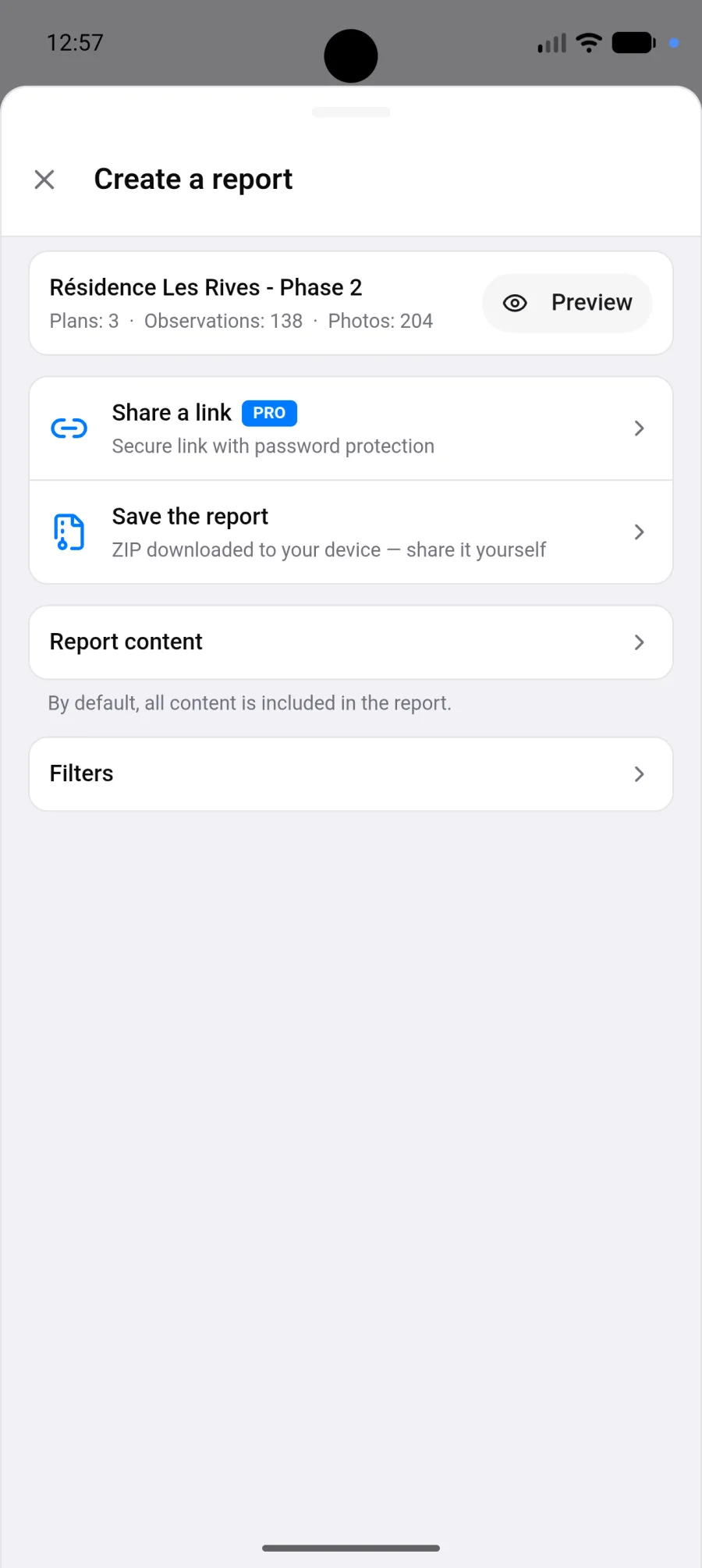
Generating
Section titled “Generating”- In the project, tap Create a report.
- Check the summary at the top, for example “Plans: 3 · Observations: 37 · Photos: 210”. Preview shows the report first and does not count as an export.
- Optionally open Report content to choose what the archive includes and the photo quality, and Filters to narrow the content.
- Tap Save the report to download it, or Share a link to publish it online.
By default, the report is a ZIP archive containing the PDF report, the HTML report, all the photos and the source plans.
Large projects take a few minutes. You can leave the screen: generation continues.
Choosing what the archive includes
Section titled “Choosing what the archive includes”Report content lists four checkboxes, all ticked by default: PDF Report, HTML Report, All PDF source plans and All photos.
- All photos stays ticked while HTML Report is ticked, because the HTML report displays its photos from that folder.
- At least one checkbox must stay ticked.
- The photo quality only appears when the archive contains photos.
Keeping only PDF Report gives a light archive that downloads quickly on mobile data.
These choices only apply to the archive you download with Save the report. A report shared online always carries both the PDF and the HTML report.
Choosing what goes in
Section titled “Choosing what goes in”By default the report covers the whole project. Filters narrow it down, and they stack:
| Filter | Typical use |
|---|---|
| Plans | Deliver only one building, one floor or one trade. The General observations chip covers the observations that are not on any plan |
| Activity | Keep only the viewpoints from one period, for a visit write-up |
| Creators | Isolate one contributor’s work |
| Media types | Keep only what has a photo, or spot what has none |
| Colors | Deliver a single category if you code by colour |
While a filter is active, the summary shows what will be kept, for example “Plans: 2/5 · Observations: 12/37 · Photos: 48/210”.
When the report would be empty
Section titled “When the report would be empty”If the report would have nothing in it, a warning appears at the top of the screen: either the current filter excludes everything in the project, or the project has no plans and nothing recorded yet.
The warning does not block you: you can still create the report. On the free plan, an empty report still counts as one of your 3 reports.
Photo quality
Section titled “Photo quality”| Level | Resolution | When to use it |
|---|---|---|
| Small | around 1280 px | Sending from site on mobile data |
| High | around 1920 px | The right compromise in most cases |
| Highest | original size | When the photo is evidence |
On a mobile connection, Small or High avoid an endless upload.
What the report looks like
Section titled “What the report looks like”- A photo is never cut in half at a page break. A long observation continues on a new card marked “(continued)”.
- An observation with no photo and no comment takes a single compact row.
- A photo or video that could not be included is shown as a “Media unavailable” tile instead of disappearing.
- An empty report says so on its cover.
- The HTML report reads from top to bottom like a document, with comments and audio comments in the page, and it can be printed.
Two destinations
Section titled “Two destinations”Save the report
Section titled “Save the report”The ZIP archive is downloaded to the phone. It is then up to you to pass it on.
Share a link
Section titled “Share a link”PhotoReport hosts the report and gives you a password-protected address, which the recipient opens with no account and nothing to install.
- Tap Share a link.
- Set a password, or tap Generate a password. Six characters minimum.
- Choose the validity: 7, 30 or 90 days.
- Tap Create share link.
- Copy the address and the password.
Sharing online requires a Pro or Teams subscription. See Subscription.
The free plan limit
Section titled “The free plan limit”The free plan allows 3 reports in total, by any method, sample project and empty reports included. The Save the report row tells you where you stand, for example “2/3 reports created”. Preview does not count.
If generation fails
Section titled “If generation fails”| Message | What to do |
|---|---|
| Rendering timed out | Filter to reduce the number of plans or photos |
| Report too large | Lower the photo quality, or split into several reports |
| Too many photos to export at once | Deliver plan by plan using the filters |
| Network error | Check the connection and tap Retry |